Bạn có biết, chỉ cần một câu lệnh mô tả bạn đã có thể tạo ra những bức ảnh đẹp, độc đáo và mang phong cách riêng. Trong bài viết này, hãy cùng MKT Software tìm hiểu 999+ câu lệnh tạo ảnh ChatGPT giúp bạn tạo ra những hình ảnh ấn tượng, đẹp mắt và trendy nhất hiện nay.
I. Câu lệnh tạo ảnh ChatGPT là gì?
Câu lệnh tạo ảnh ChatGPT (AI Prompt) là những lệnh mô tả chi tiết giúp AI hiểu được bạn muốn tạo ra hình ảnh như thế nào. Những câu lệnh này thường được sử dụng trong các mô hình tạo ảnh AI như DALL-E tích hợp trong ChatGPT hoặc các nền tảng AI khác như Midjourney, Stable Diffusion.
Hãy đảm bảo đưa ra những câu lệnh thật chi tiết và có tính hệ thống. Điều này sẽ giúp bạn tiết kiệm thời gian chỉnh sửa và có được hình ảnh chất lượng cao như mong muốn phục vụ cho thiết kế, marketing hoặc sáng tạo nội dung.
Câu lệnh tạo ảnh Chat GPT chuẩn giúp bạn tạo ảnh như ý muốn
II. 999+ câu lệnh tạo ảnh ChatGPT hay nhất
Dưới đây là tổng hợp 999+ câu lệnh tạo ảnh ChatGPT đẹp và trendy nhất theo các chủ đề. Bạn có thể tham khảo để tạo ra bức ảnh như mong muốn nhé!
1. Câu lệnh cho ChatGPT ghép ảnh
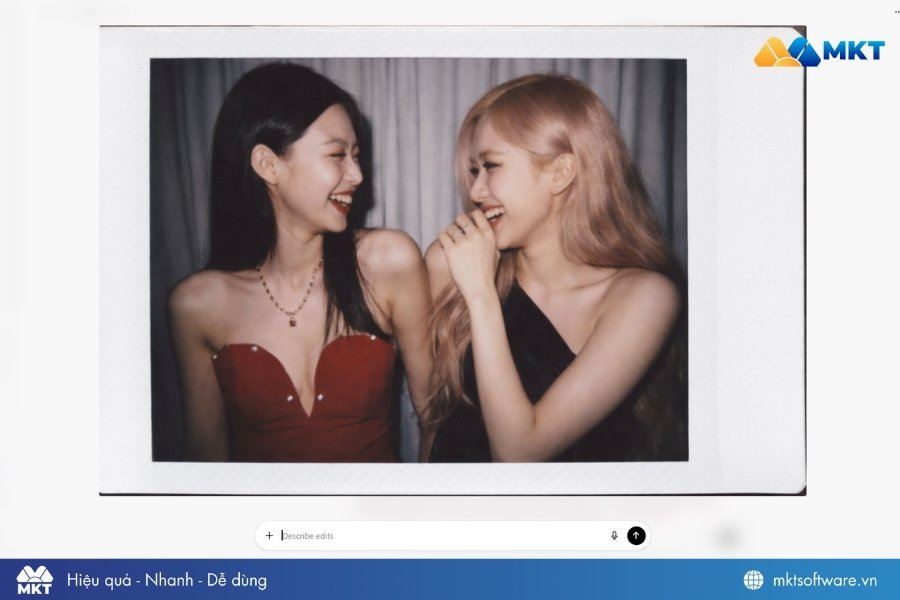
Trước khi sử dụng prompt ghép ảnh, bạn cần tải lên ảnh gốc mà mình muốn chỉnh sửa hoặc ghép. Sau đó có thể sử dụng các câu lệnh tạo ảnh ChatGPT như:
Prompt: Combine these two images and create a picture taken with a Polaroid camera. The photo should be landscape, clear and realistic, with no obvious subjects or props. The photo should have a slight blur effect and a consistent light source, such as a flash in a dark room, spread throughout the photo. Don't change the faces, change the striped curtains to white curtains and let the people look at each other and laugh. Câu lệnh cho ChatGPT ghép ảnh 2 người
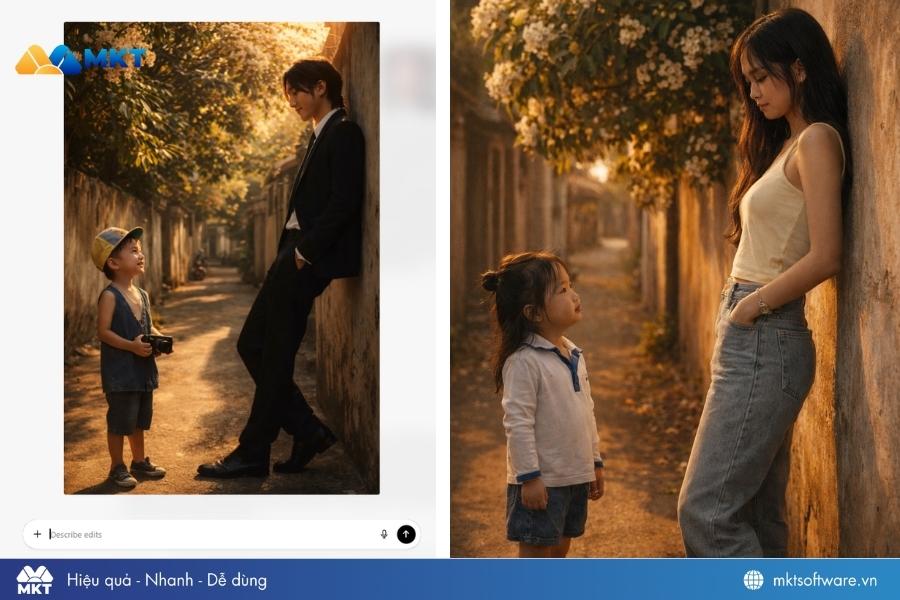
Prompt: A cinematic, photorealistic full-body shot of an adult meeting his childhood self in an old residential alley with a large tree with white flowers, captured from the side view. The adult leans against the alley wall, gazing softly at the child, while the child stands at a distance looking up at him with admiration. Both figures are shown in full body, with realistic proportions and natural posture. Warm golden hour sunlight streams from the side, casting long shadows and creating a nostalgic mood over the worn alley walls and glowing mango leaves. Replace both faces with the ones from the uploaded photos, keeping every detail of their hair, outfits, and accessories exactly as in the reference images. Vertical 9:16 ratio, realistic skin texture, natural expressions, cinematic lighting, and warm tones. Câu lệnh cho ChatGPT ghép ảnh hồi nhỏ
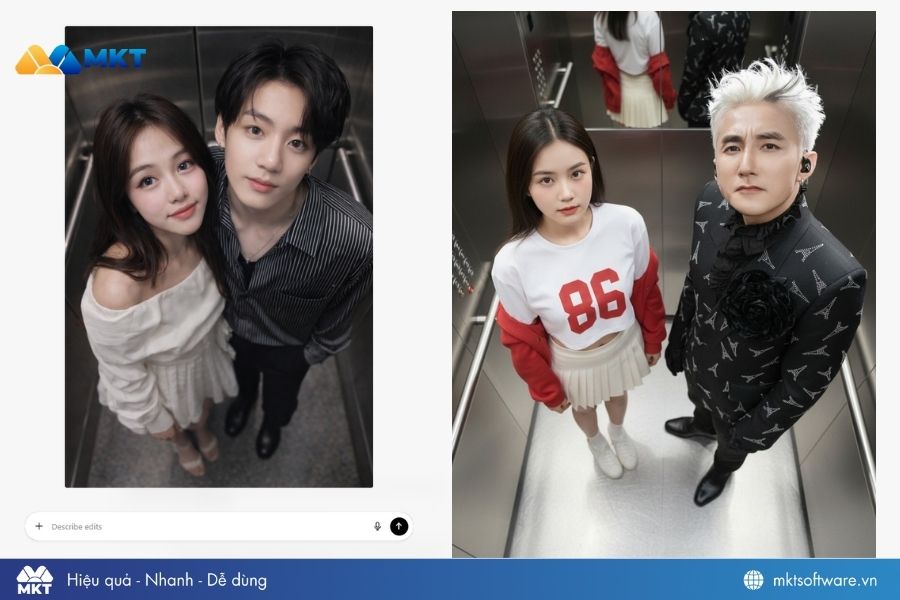
Prompt: Combine two photos into one seamless image. Keep the original faces and clothing unchanged, ensuring the facial details look realistic and authentic. The scene should resemble a photo booth style picture taken from above, giving the impression of a narrow, confined space inside an elevator. The young man and the other character stand next to each other, both looking upward directly at the camera. Their feet are touching the elevator floor, and the background clearly shows the interior of the elevator cabin. The composition should be vertical with a 9:16 aspect ratio, cinematic lighting, bright tones, and ultra-clear 8K resolution.
Câu lệnh cho ChatGPT ghép ảnh người nổi tiếng 2. Câu lệnh tạo ảnh chân dung ChatGPT
Nếu bạn muốn tạo ảnh chân dung ấn tượng bằng AI, các câu lệnh tạo ảnh ChatGPT sau sẽ giúp bạn có hình ảnh đẹp và chuyên nghiệp hơn.
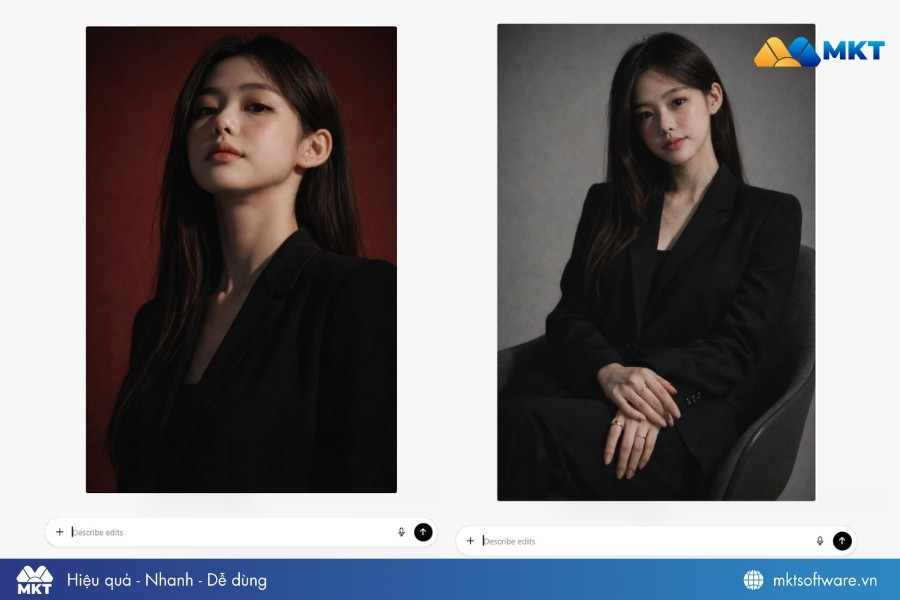
Prompt: Vertical portrait, 1080×1920. Keep the same facial features. Subject wearing a black blazer. Stark cinematic lighting with strong contrast.
Prompt: Shot from a slightly low, upward angle to emphasize jawline and neck, evoking quiet dominance and sculptural elegance. Deep, saturated crimson red background for bold contrast against luminous skin and dark wardrobe.
Prompt: A photorealistic fashion studio portrait of a young woman sitting on a modern chair, wearing an elegant black tailored suit, long straight black hair falling over her shoulders, natural soft makeup, pink lips, delicate jewelry on her fingers, soft studio lighting, neutral gray background, high detail, cinematic look. Keep the original face and facial expression from the uploaded image.
3. Câu lệnh tạo ảnh ChatGPT nghề nghiệp
Bạn cũng có thể tạo ảnh đại diện nghề nghiệp hoặc ảnh cá nhân chuyên nghiệp bằng những câu lệnh tạo ảnh ChatGPT dưới đây:
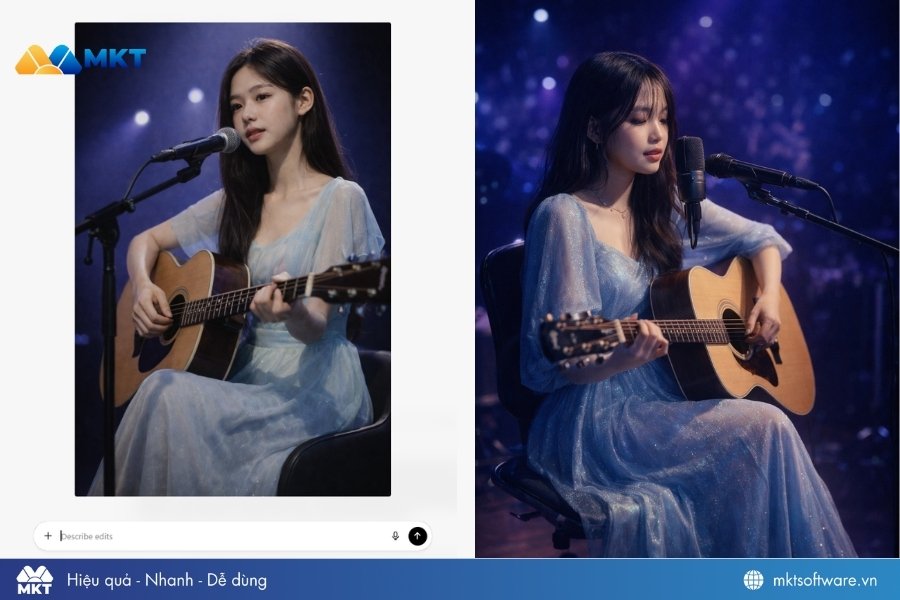
Prompt: A young female singer performs live on a softly lit stage, sitting with an acoustic guitar. She wears a flowing light-blue dress that shimmers under the spotlight. The stage lighting features deep blue and violet hues, creating a dreamy concert mood. Her hair falls naturally, and her expression conveys calm emotion as she sings into a studio microphone. Ultra-realistic lighting, 8K concert photography, cinematic depth, professional stage setup, shallow depth of field, soft glow. Câu lệnh tạo ảnh ChatGPT nghề nghiệp
4. Câu lệnh ChatGPT tạo ảnh cưới, cặp đôi
Với các cặp đôi, những câu lệnh tạo ảnh ChatGPT dưới đây sẽ tạo nên những bức ảnh thật lãng mạn:
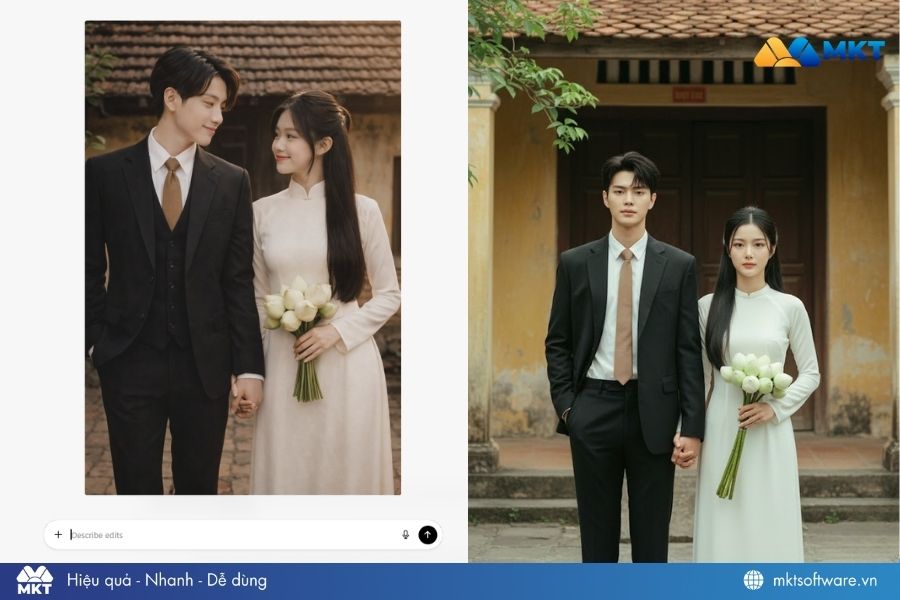
Prompt: A young couple takes photos in a romantic setting in the retro wedding style. The man wears a smart black suit, a white shirt, a light brown tie, standing straight and leisurely, one hand in his pocket, the other hand gently holding the girl's hand. The woman wears a traditional white ao dai, smooth white skin, natural clear makeup, light pink lips, bright eyes. Long, straight black hair, half-up, the rest hanging down behind. In her hand, she holds a bouquet of white lotus buds, standing straight and gentle next to the boy. The background is an old house with a red-brown tiled roof, old yellow walls, dark brown wooden doors and a few green branches in front. Natural light shines down, creating a warm, gentle and nostalgic atmosphere.
Câu lệnh ChatGPT tạo ảnh cặp đôi đẹp
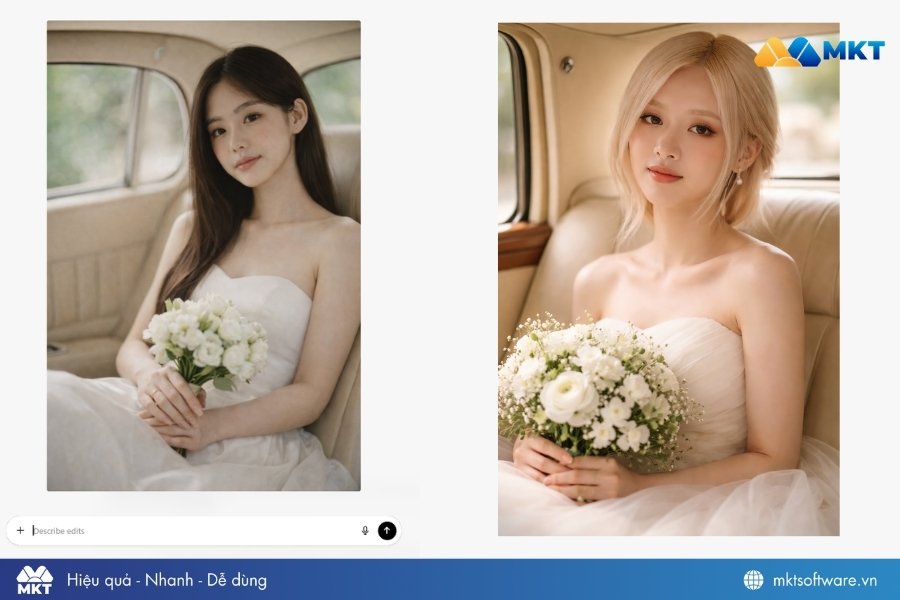
Prompt: Use the exact face and figure of the woman in the attached photo. A romantic bridal portrait of the bride sitting gracefully in the backseat of a cream-colored vintage car. She wears a strapless white wedding gown and holds a bouquet of white flowers. Lighting & Colors: Soft natural light from outside highlights her radiant skin. The overall palette—white, cream, beige, and green—evokes a timelessly romantic, warm, and elegant atmosphere. Photographed with an 85mm f/1.2 lens, ultra-shallow depth of field.
Câu lệnh ChatGPT tạo ảnh cưới cô dâu
5. Tạo ảnh ChatGPT mô hình để bàn 3D
Bạn có thể sử dụng câu lệnh dưới đây để tạo ảnh ChatGPT mô hình để bàn 3D:
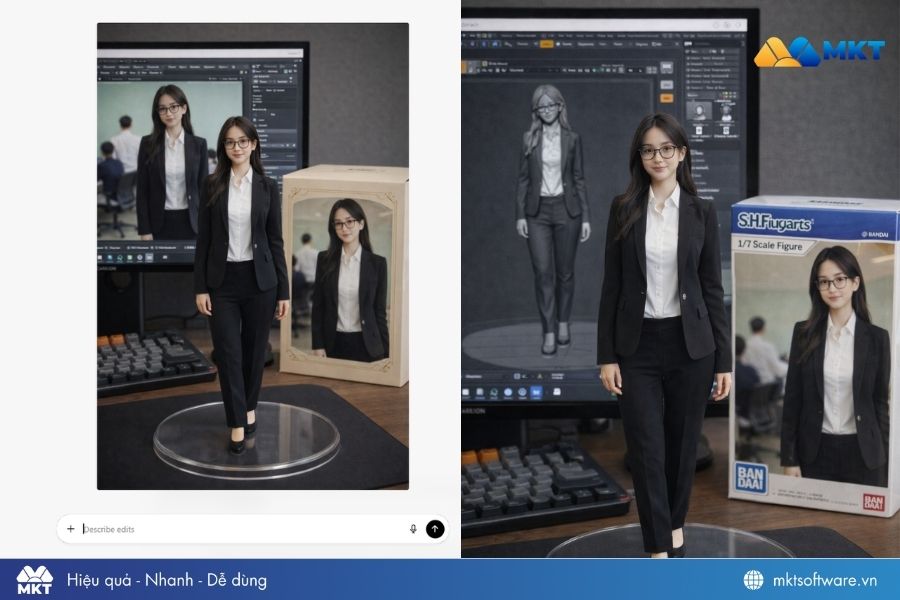
Prompt: Create a 1/7 scale commercialized figurine of the characters in the picture, in a realistic style, in a real environment. The figurine is placed on a computer desk. The figurine has a round transparent acrylic base, with no text on the base. The content on the computer screen is a 3D modeling process of this figurine. Next to the computer screen is a toy packaging box, designed in a style reminiscent of high-quality collectible figures, printed with original artwork. The packaging features two-dimensional flat illustrations.
Prompt: Create a 1/7 scale commercialized figure of the character in the illustration, in a realistic style and environment. Place the figure on a computer desk, using a circular transparent acrylic base without any text.On the computer screen, display the ZBrush modeling process of the figure. Next to the computer screen, place a BANDAI-style toy packaging box printed with the original artwork.
Promt Tạo ảnh ChatGPT mô hình để bàn 3D
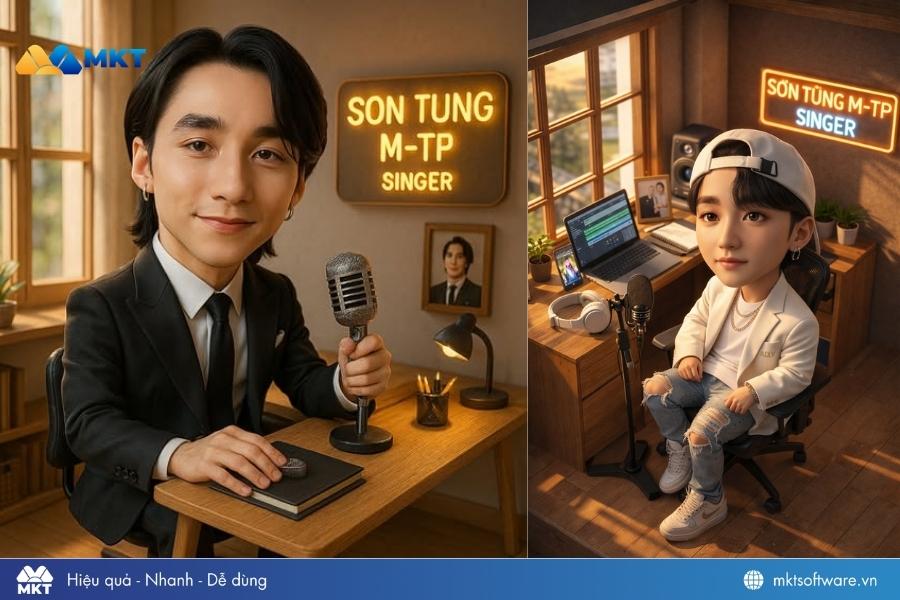
Prompt: Son Tung MTP, Occupation: Singer. Style: An isometric 3D cutaway, Create a realistic miniature caricature of the person in the uploaded image. Character: a caricature-style seated person, large head and small body, Style should be realistic with natural lighting and fine details on the face. Setting: A cozy, modern home office with a wooden desk. Outfit: Fashion, Clothing, accessories, shoes and any tools or props should match the theme and reflect the person's occupation. There is a bright neon name and occupation sign next to it, sunlight streaming through a wood-framed window, warm ambient lighting, natural wood floors, and modern minimalist decor. A photo, soft shadows, a peaceful and inviting atmosphere.
Câu lệnh tạo ảnh ChatGPT 3D
6. Câu lệnh tạo ảnh ChatGPT phong cách hoạt hình
Nếu bạn thích phong cách hoạt hình, dễ thương thì dưới đây là câu lệnh tạo ảnh ChatGPT bạn có thể dùng:
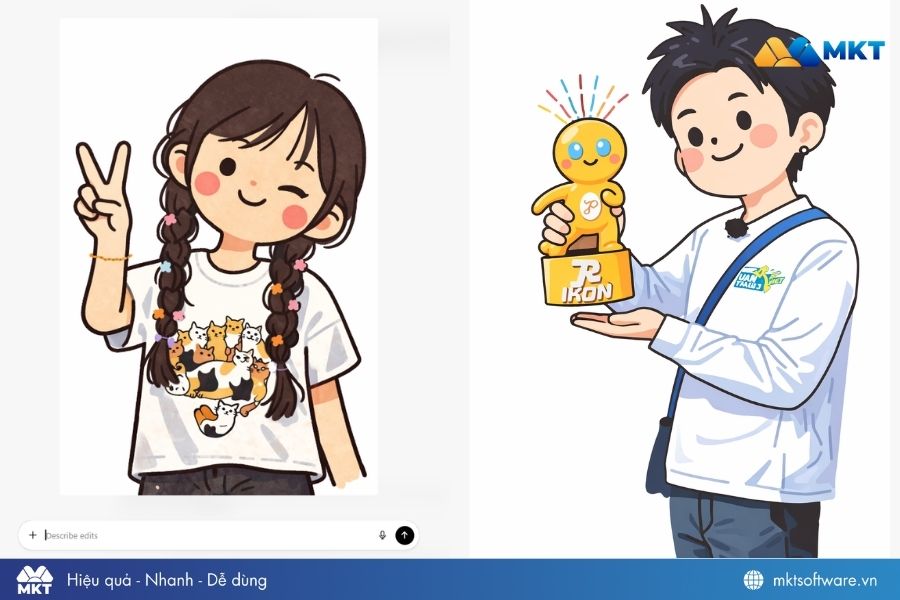
Prompt: Transform the subject from the uploaded image into a character in the style of flat illustration or minimalist illustration cartoon.
Bright and saturated palette color, childlike proportions, playful hand-drawn charm, and simple textures.
Minimalist Facial Features:
- Face: simplified basic circles shape
- Eyes: Typically small, simple black dots.
- Nose: Often absent or represented by a tiny dot or simple curve.
- Mouth: A simple, upward curve, always conveying a cheerful and happy expression.
- Cheeks: Pink circles (blush) are often adđe to enhance the cuteness.
Retain the subject's original clothing, hairstyle, facial features, accessories, skin tone, pose, and expression. Clothing should be simplified into flat shapes and bright colors, while keeping the overall outfit recognizable.
Background: plain white or transparent to keep the focus on the character.
Negative prompt:
“No realistic shading, no detailed rendering, no anime or manga style, no 3D modeling, no photo textures”.
Câu lệnh tạo ảnh ChatGPT phong cách hoạt hình
7. Một số câu lệnh tạo ảnh ChatGPT trendy
Dưới đây là một số câu lệnh tạo ảnh ChatGPT trendy mà bạn có thể dùng:
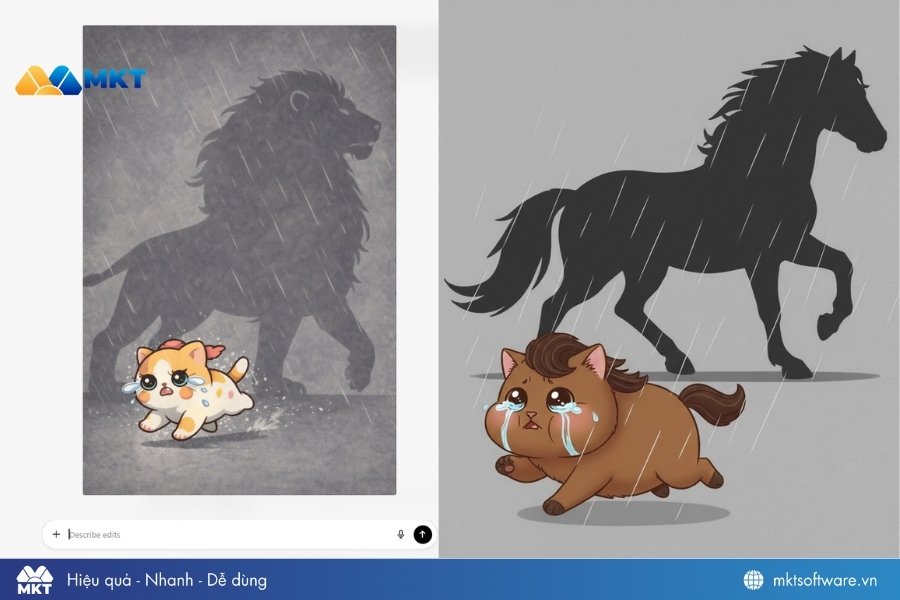
Prompt: 2D illustration, a very tiny cute chubby [angry CAT], side view running left to right, big glossy eyes with tears pouring down, small mouth quivering, strong emotional expression, fragile but determined pose, energetic run cycle, heavy rain lines, stormy mood, flat grey background, subtle texture, behind the tiny [CAT], a massive towering 2D shadow silhouette of a powerful majestic [LION] in full stride, dramatically oversized scale (5x larger than the small animal), muscular physique, strong, heroic stance, dynamic movement, epic proportions, the shadow looming large and imposing on the grey backdrop, representing inner greatness and hidden potential, extreme size contrast between tiny cute animal and giant shadow figure, clean 2D lineart, gentle soft shading, pastel tones, emphasis on character emotion and scale drama.
Câu lệnh tạo ảnh vừa làm vừa khóc ChatGPT
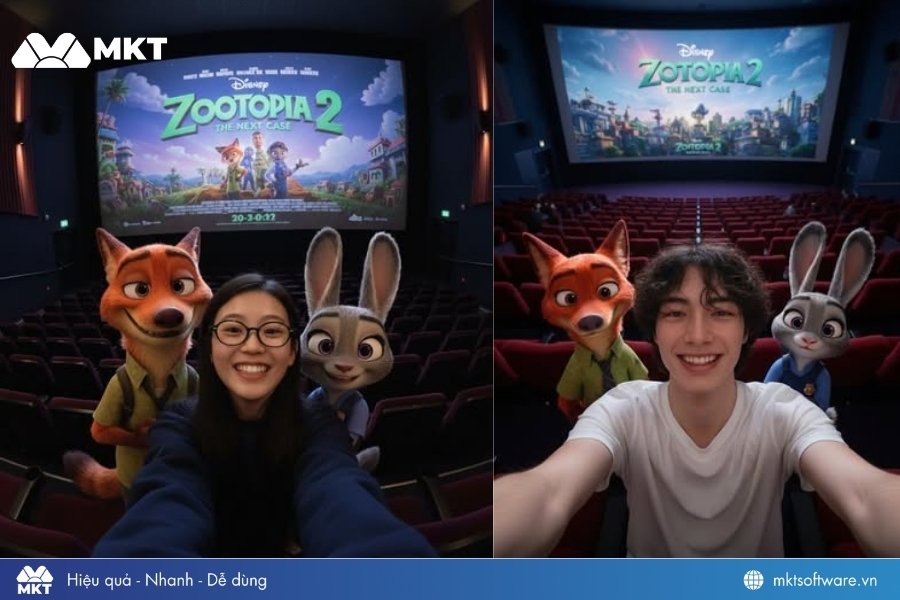
Prompt: Using the attached image, generate a high-angle selfie as if shot at 0.5x on an iPhone. I am positioned at the center, taking the selfie together with Nick Wilde and Judy Hopps from Zootopia.
All three of us are smiling inside a movie theater, with a large cinema screen behind displaying a clear poster for Zootopia 2.
The theater seats in the background should appear softly blurred, and the overall lighting should be dim, creating the feeling of a moment just before the movie starts. The style must be photorealistic. Aspect ratio: 3:4.
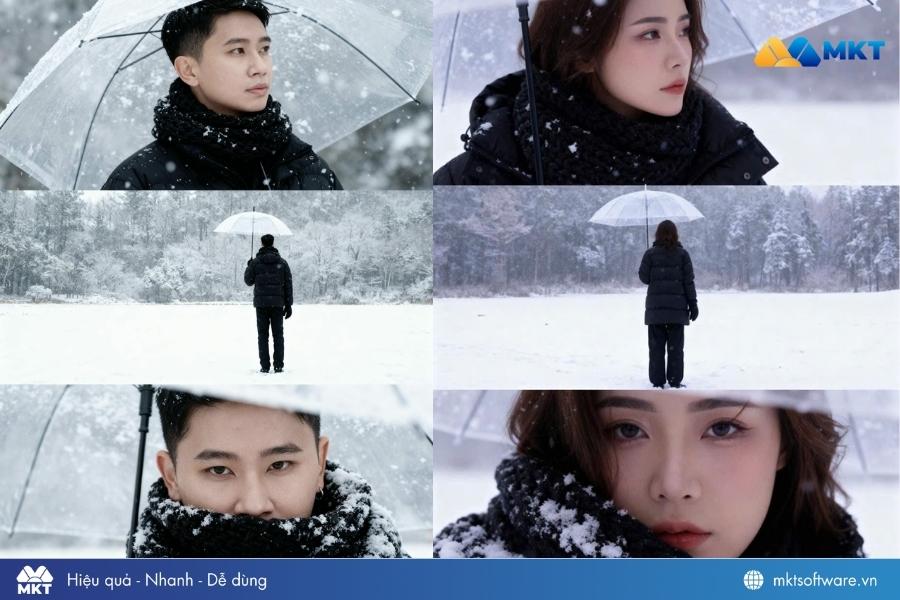
Câu lệnh ChatGPT tạo ảnh Zootopia Prompt: Dựa trên ảnh gương mặt tham chiếu này, hãy tạo Bộ ảnh điện ảnh ba khung hình chụp cận cảnh một người trẻ giữa khung cảnh núi tuyết buổi hoàng hôn, thể hiện bằng chi tiết siêu thực.
Nhân vật có mái tóc bồng nhẹ. Nhân vật mặc áo khoác len đen dài, quàng khăn len xanh dày và mang găng tay xanh. Tuyết rơi nhẹ, đọng lại trên tóc, vai và áo, tạo nên bầu không khí mùa đông trữ tình bên hồ băng tĩnh lặng.
• Khung 1: Cận cảnh từ sau vai - Nhân vật hơi nghiêng đầu nhìn về phía dãy núi xa trong hoàng hôn, tuyết rơi nhẹ trên tóc và vai.
• Khung 2: Trung cảnh nửa người nghiêng bên - Nhân vật cầm bó hoa, khẽ ngẩng đầu đón tuyết, hơi thở tạo làn khói mờ trong không khí lạnh.
• Khung 3: Cận gương mặt - ánh sáng hoàng hôn xanh lam phản chiếu nhẹ trên khuôn mặt, tuyết bám trên khăn và tóc, ánh nhìn sâu lắng và mơ màng.
Phông nền là rừng và sông phủ tuyết mờ xa, được làm mờ hậu cảnh để nhấn mạnh cảm xúc gương mặt.
Ánh sáng: tự nhiên lúc hoàng hôn, pha ánh flash dịu, làm nổi bật độ tương phản giữa tuyết trắng và sắc xanh lam trên khăn.
Phong cách: điện ảnh, chân thực, lãng mạn mùa đông, hạt film mịn, DOF nông, ánh sáng mềm.
Bố cục: khung dọc 16:9, ba khung xếp chồng từ trên xuống như bộ ảnh điện ảnh liền mạch, duy trì cùng không khí tuyết rơi xuyên suốt, nhân vật chiếm khung hình nhiều hơn.
Câu lệnh ChatGPT tạo ảnh tuyết rơi
III. Cấu trúc câu lệnh tạo ảnh ChatGPT
Để có được một bức ảnh đẹp và đúng ý, bạn cần nắm vững cấu trúc câu lệnh tạo ảnh ChatGPT. Một prompt chất lượng thường bao gồm các yếu tố sau:
Yếu tố
Mục đích
Ví dụ
Đối tượng chính
Mô tả rõ đối tượng chính trong bức ảnh (người, vật, phong cảnh, con vật). Mô tả càng cụ thể thì ChatGPT càng dễ hiểu và tạo ảnh chính xác hơn.
Một cô gái mặc váy trắng đứng giữa cánh đồng hoa, một chú mèo đang cuộn tròn ngủ trên sofa,...
Hành động hoặc bối cảnh
Bối cảnh giúp bức ảnh trở nên sống động và có câu chuyện hơn.
Đang đọc sách bên cửa sổ vào buổi sáng, đang chạy trên bãi biển lúc hoàng hôn,...
Phong cách nghệ thuật
Phong cách hình ảnh quyết định “chất” của bức ảnh. Một số phong cách phổ biến gồm: Anime, Cinematic photo, Cyberpunk, Digital art, Low-poly illustration
Bổ sung các yếu tố như ánh sáng, màu sắc, góc chụp, độ phân giải hoặc độ chi tiết. Đây là yếu tố giúp nâng cao chất lượng hình ảnh.
Ánh sáng hoàng hôn vàng ấm (golden hour lighting), góc chụp cận cảnh (close-up), độ phân giải 4K, hoặc hình ảnh siêu thực (ultra realistic).
Cảm xúc và không khí
Để bức ảnh có chiều sâu, bạn nên mô tả cảm xúc hoặc bầu không khí mà bức ảnh nên có.
Cảm giác ấm áp và yên bình, không khí bí ẩn trong thành phố về đêm hoặc tâm trạng hoài niệm giữa khung cảnh mùa xuân.
Cách tạo ảnh bằng ChatGPT hiệu quả là sắp xếp thông tin theo nguyên tắc và đúng thứ tự ưu tiên. Bạn nên bắt đầu với đối tượng chính, đến mô tả hành động hoặc tư thế, tiếp đến là môi trường xung quanh. Cuối cùng, bổ sung phong cách nghệ thuật, chi tiết kỹ thuật và cảm xúc để giúp AI tạo ra hình ảnh sinh động và đúng với ý tưởng.
IV. Mẹo để câu lệnh tạo ảnh ChatGPT tối ưu hơn
Để câu lệnh tạo ảnh ChatGPT của bạn thêm tối ưu và đúng với ý mình, bạn có thể áp dụng một số mẹo hay dưới đây:
Viết câu lệnh chi tiết và rõ ràng: Thay vì mô tả chung chung như “một con mèo”, hãy cụ thể hơn như “một chú mèo lông ngắn màu xám đang nằm ngủ trên bệ cửa sổ dưới ánh nắng buổi sáng” để AI dễ hiểu và tạo ảnh chính xác hơn.
Ưu tiên sử dụng tiếng Anh: Các mô hình AI thường nhận diện tiếng Anh tốt hơn.
Tối ưu ánh sáng và màu sắc: Sử dụng các từ khóa mô tả ánh sáng như golden hour lighting, soft pastel tones hoặc high contrast cinematic để giúp bức ảnh có chiều sâu và cảm xúc hơn.
Dùng từ khóa nâng cao: Thêm các cụm từ như ultra realistic, 8K, highly detailed, sharp focus, depth of field để tăng độ chi tiết và chất lượng hình ảnh do AI tạo ra.
Chọn đúng tỷ lệ khung hình: Tùy mục đích hiển thị mà chọn tỷ lệ phù hợp như 1:1 cho avatar hoặc bài đăng mạng xã hội, 16:9 cho banner và 9:16 cho video TikTok.
Kết hợp với công cụ chỉnh sửa ảnh: Sau khi tạo ảnh bằng ChatGPT, bạn có thể dùng thêm Photoshop, Lightroom hoặc Canva để chỉnh màu, bố cục và nâng cao chất lượng hình ảnh.
Tạo nhiều phiên bản để so sánh: Hãy thử chạy 3–5 prompt khác nhau cho cùng một ý tưởng, sau đó chọn ra bức ảnh đẹp và phù hợp nhất.
Kết luận
Câu lệnh tạo ảnh ChatGPT sẽ giúp bạn khai thác tối đa sức mạnh của AI trong việc tạo ra hình ảnh sáng tạo. Khi hiểu rõ cấu trúc prompt, kết hợp mô tả chi tiết, phong cách nghệ thuật và yếu tố kỹ thuật, bạn hoàn toàn có thể tạo ra những bức ảnh đẹp không kém gì ảnh chụp chuyên nghiệp.